I can't life without smartphone. I think, everyone needs phone. It's not too much to say that we're living in a technological era since we can find almost everything on the internet and our life depends on technology a lot. Nowdays, humans depends their life on smartphone deeper than they realized. Phone isn't used just to text or calls like it did on the past. This age phone can do a lot more than their predecessor. Smartphone now equipped by application that can access almost everything. Like online newspaper, electronic books, wikipedia, etc. And to top it, smartphone also equipped with social media apps like on like BBM, Line, Whatsapp, Facebook, Instagram, Dropbox, etc that make it easier for us to communicate and share things to each other. I'm sure almost everyone in the world use social media today. Not just kids and teenagers, but also adults. I bet some adults who is also parents use social media so they don't want to outdated by their child...
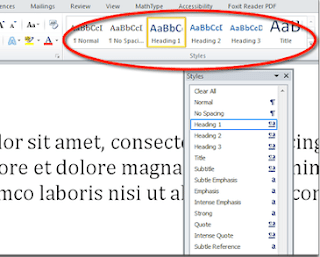
The easiest way on making title is using heading 1 as follow : 1. On word 2003 and earlier click style box on formatting menu then click heading 1. 2. On word 2007, 2010, and 2013, click heading 1 on group style on home menu. Making table of contents after deciding on title and subtitle that you're going to put on table of contents, it's time to show you how to make the table of contents. Making table of contents for word 2003 and earlier : Click on blank space where you want your table of contents located. Click insert > index and tables (word 2000) or open insert > reference > index and tables (word 2002 and word 2003) to open table of contents window. Click on table of contents tab than click ok. Where for word 2007, 2010 and 2013, follow these steps : Open reference > table of contents. Choose first and second option on that menu. Both of the option will automatically make table of contents based on the title and subt...
Assalammualaikum miss Dini, my kindest lecturer. First of all, I want to apologize for handed in the assignment late Each person has a different skills. Now, I'm going to tell you about my skill(s). Ever since I'm going to engineering faculty, there's a lot of knowledge that I get. Those knowledge led to me to be an assistant of survey and mapping laboratory on my faculty. I also gained a lot of knowledge from my lab colleagues. They teach me how to take topographic survey data and then turn the data into a drawing. Those drawings can be made using application called Autocad. Using Autocad is one of my skills. I can draw building construction with it. For Example, I made drawings of highways part, foundation, simple building, contour map of measurement result, road planning, and drawings of other construction. Autocad itself isn't really hard to learn, if we used it often enough to draw. But even thought I'm pretty good on using Autocad, my skill is st...
Komentar
Posting Komentar